PFI (Pacman-FZF Installer)
Interactive package selector for installing packages on Arch Linux-based systems, using pacman with an enhanced interface powered by fzf.
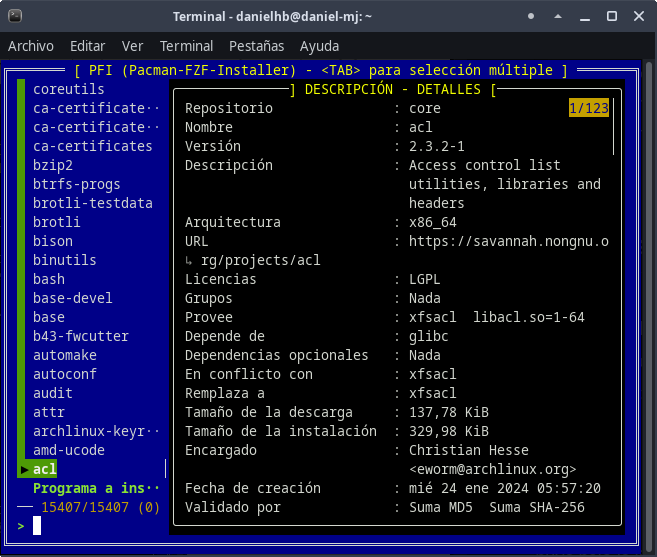
Description
This script combines the power of the pacman package manager with the fzf fuzzy selection interface to create a visually appealing and functional package search and installation experience. It allows you to browse repositories, view detailed package information, and select multiple packages for installation.
Characteristics
- Interactive and colorful interface for package selection
- Package description preview
- List of files contained within each package
- Multiple package selection with the Tab key
- Intuitive keyboard navigation
- Custom visual design with distinctive borders and colors
Prerequisites
- Arch Linux-based operating system (Arch, Manjaro, EndeavourOS, etc.)
pacman(default package manager in Arch)fzf(fuzzy command-line selector)sudo(for installation permissions)
Installation
-
Download the script:
bash https://github.com/danielhb2/pacman-fzf-installer.git -
Give it execution permissions:
bash chmod +x pfi.sh -
Make sure you have the dependencies installed:
bash
   sudo pacman -S fzf
Usage
To run the script:
./pfi.sh
Controls
↑/↓- Navigate the package listTAB- Select/deselect packages for multiple installationsENTER- Confirm selection and install package(s)ESC- Exit without installingCTRL-X- Move page up in previewCTRL-Z- Move page down in preview
Customization
The script uses detailed color and formatting settings that you can modify to your liking:
- Change colors by adjusting the
--colorparameters - Modify border styles with the
--borderparameters - Customize selection icons (
--pointer,--marker)
Internal Workings
pacman -Slq: Lists all available packages in the repositoriesfzf: Provides an interactive interface for selection- Preview: Displays package information (
pacman -Si) and files (pacman -Fl) xargs -ro sudo pacman -S: Installs the selected packages
Troubleshooting
- Error: Command not found: Make sure you have
fzfinstalled (sudo pacman -S fzf) - No sudo permissions: Run the script as a user with sudo privileges
- No color interface: Make sure you're using a terminal that supports colors
License
This script is distributed under the MIT License. Feel free to modify and distribute it.
Author
Daniel Horacio Braga
This installer is an unofficial tool and is not affiliated with the Arch Linux project.
README written by Anthropic Claude, chatbot. - https://www.anthropic.com/claude Translated by Google translate